00:40 · Numa for LinuxLong after dark.
A free RAW photo editor and library for Linux, built with GTK 4 and libadwaita in Rust: RAW from 850 cameras, masks found on your own computer, culling that measures. Free and open source, as a package, a Flatpak or an AppImage.
64-bit Intel and AMD · GPL-3.0 or later · No account, no tracking, nothing uploaded
- 850
- cameras, in 29 raw formats, read by rawler in pure Rust. Fujifilm and Sony tested end to end.
- 0
- accounts, subscriptions or uploads. Masks, faces and measurements are worked out on your computer.
- GPL
- free and open source, version 3.0 or later. Use it for anything, paid work included.
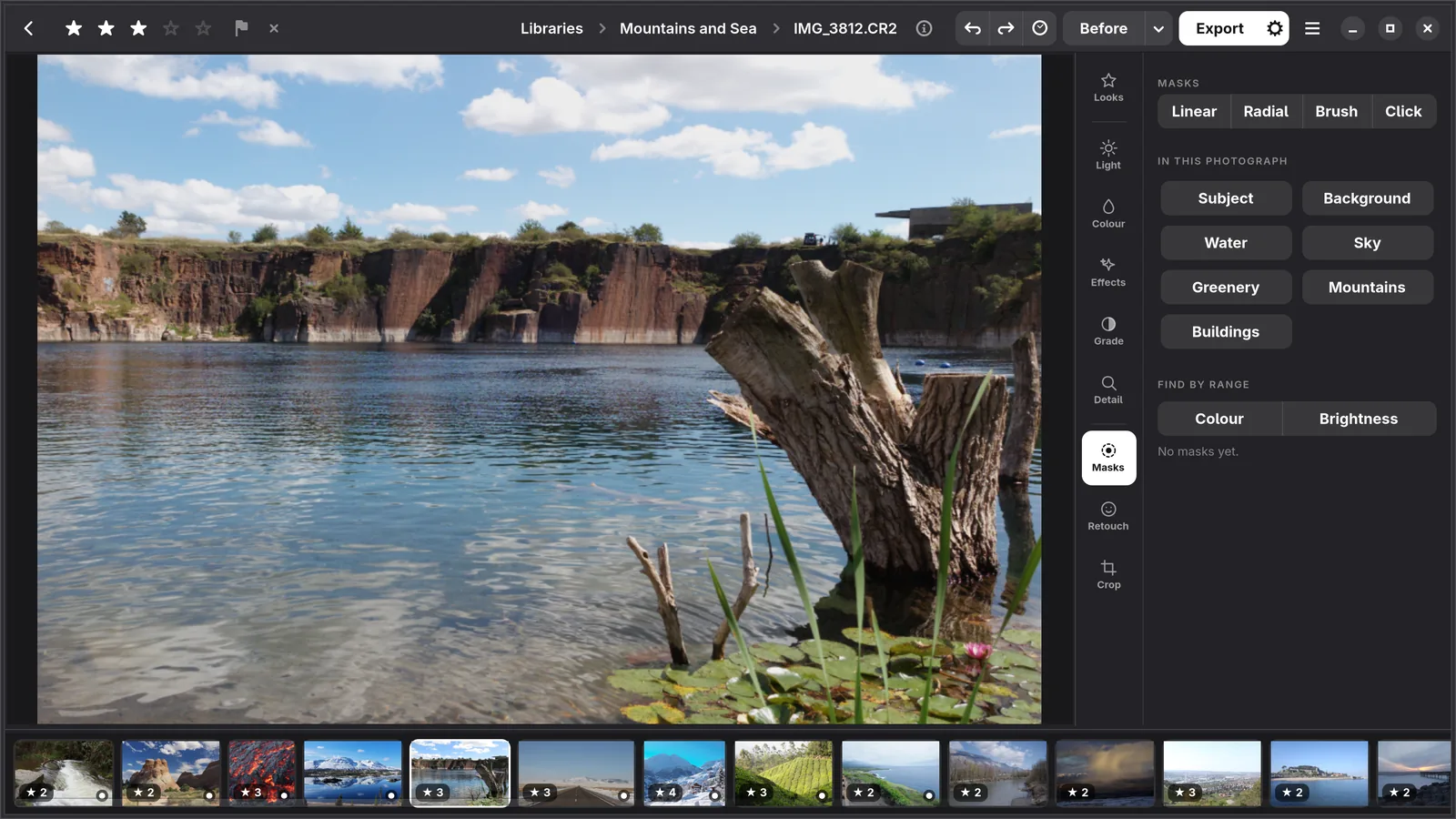
Masks
Found, not drawn.
The sky, a subject, a person, water, greenery, mountains or buildings: found in one click by models that run on your computer, and listed by name. Click on anything else to select it. Each mask has its own light, colour, curve and grade.
Culling
Up keeps. Down lets go.
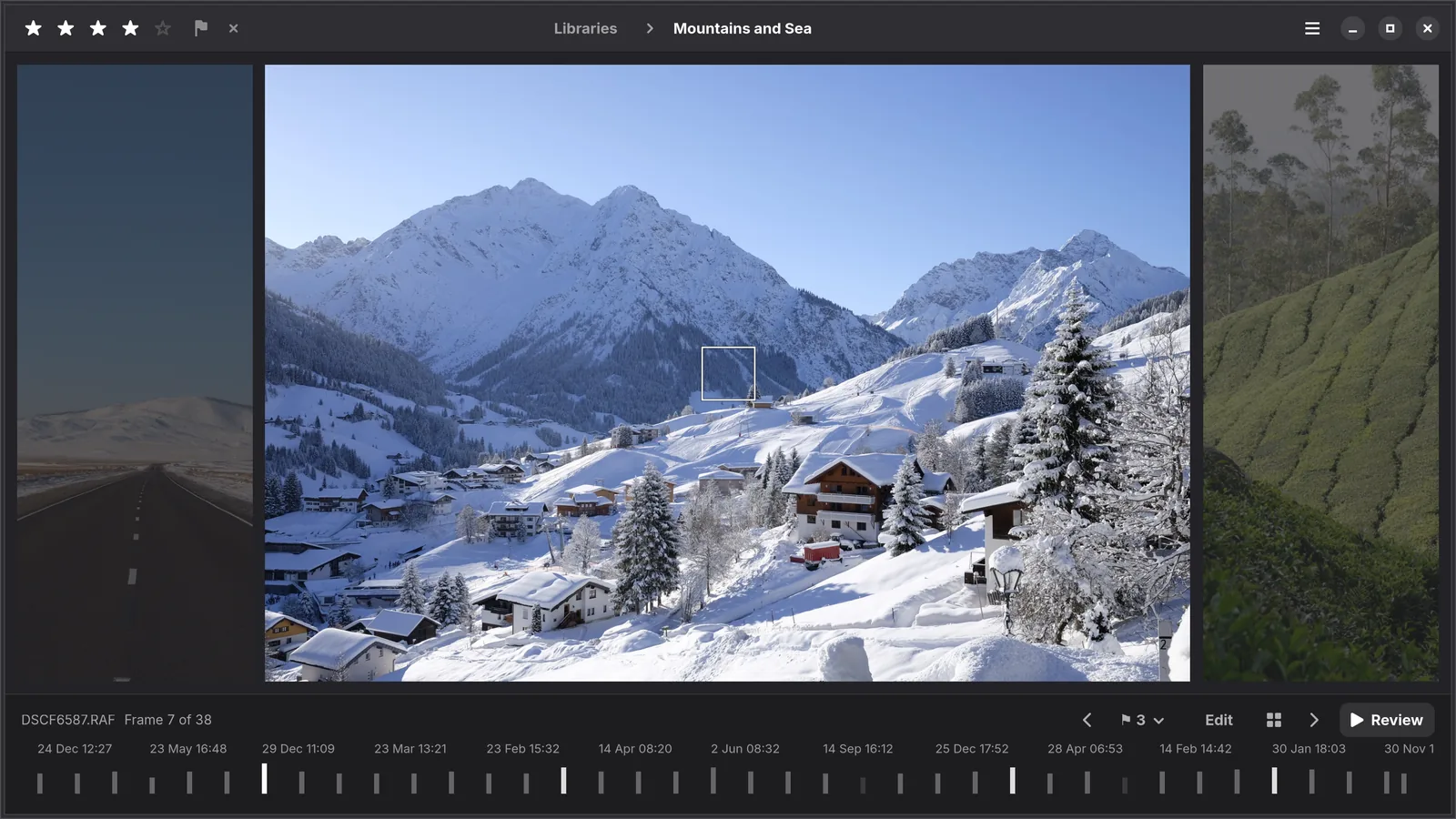
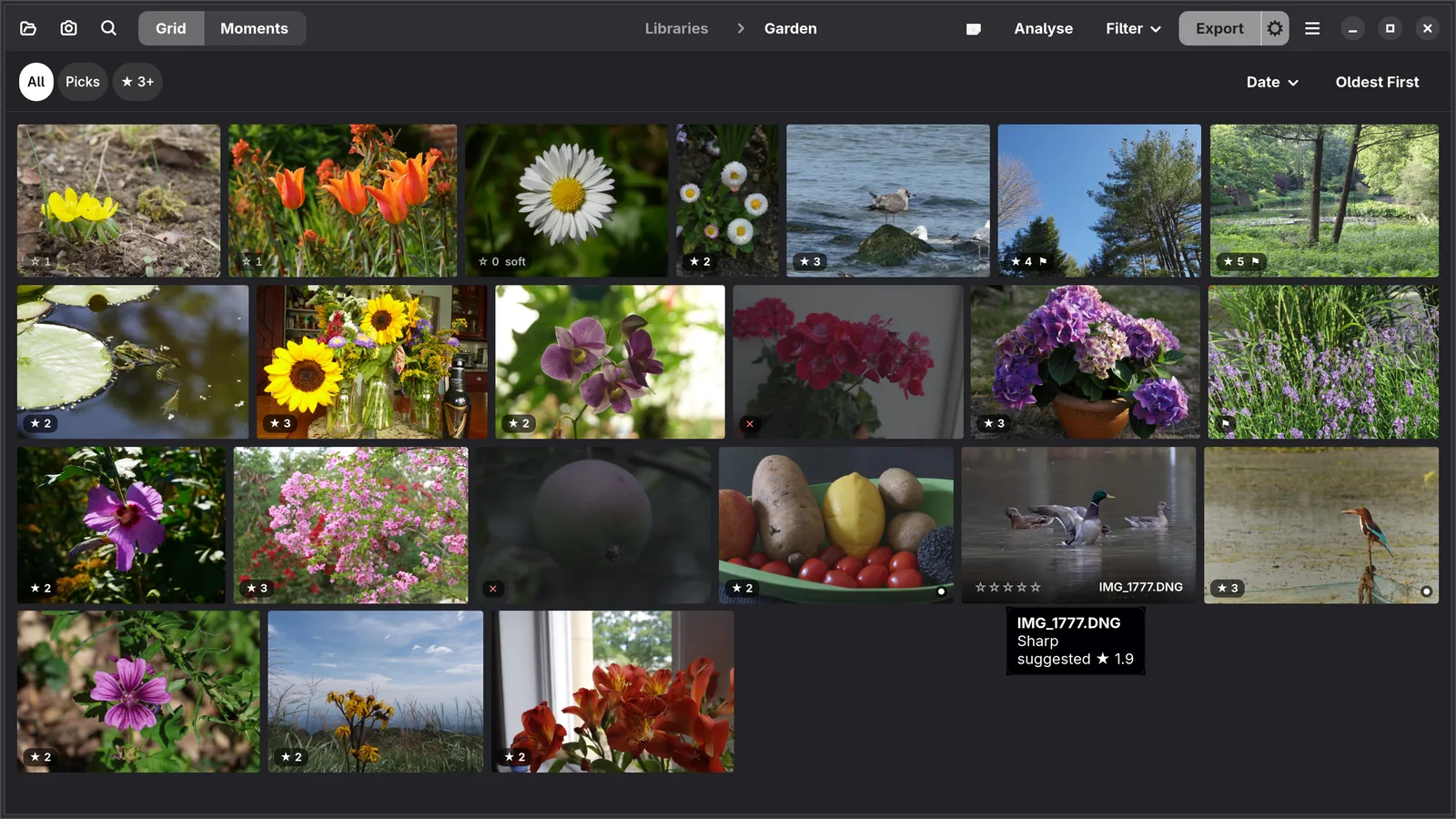
Analyse measures every frame: sharpness, blown highlights, closed eyes, and bursts with the sharpest frame marked. It suggests a rating with a short reason and never overwrites yours. In the loupe one key picks or rejects and goes on to the next.
- Spaceloupe
- ↑pick
- ↓reject
- ⌫undo
- Ccompare
Libraries
A folder is a library.
Add a folder and it is a library: no import step, no copies, nothing written beside your originals. Stars, suggested ratings and notes sit on each photograph, and a library on an external drive keeps its thumbnails while the drive is away.
Shooting tethered
Straight from the camera.
With the camera on its cable, each photograph you take comes into a library and opens large in the loupe. Same Edit as the Last gives every new frame the edit of the one before, and after a second or two Numa says what it noticed, such as Soft, or Eyes closed? A Fujifilm on USB Tether Shooting, a Sony on PC Remote.
Numa Home
Send it home.
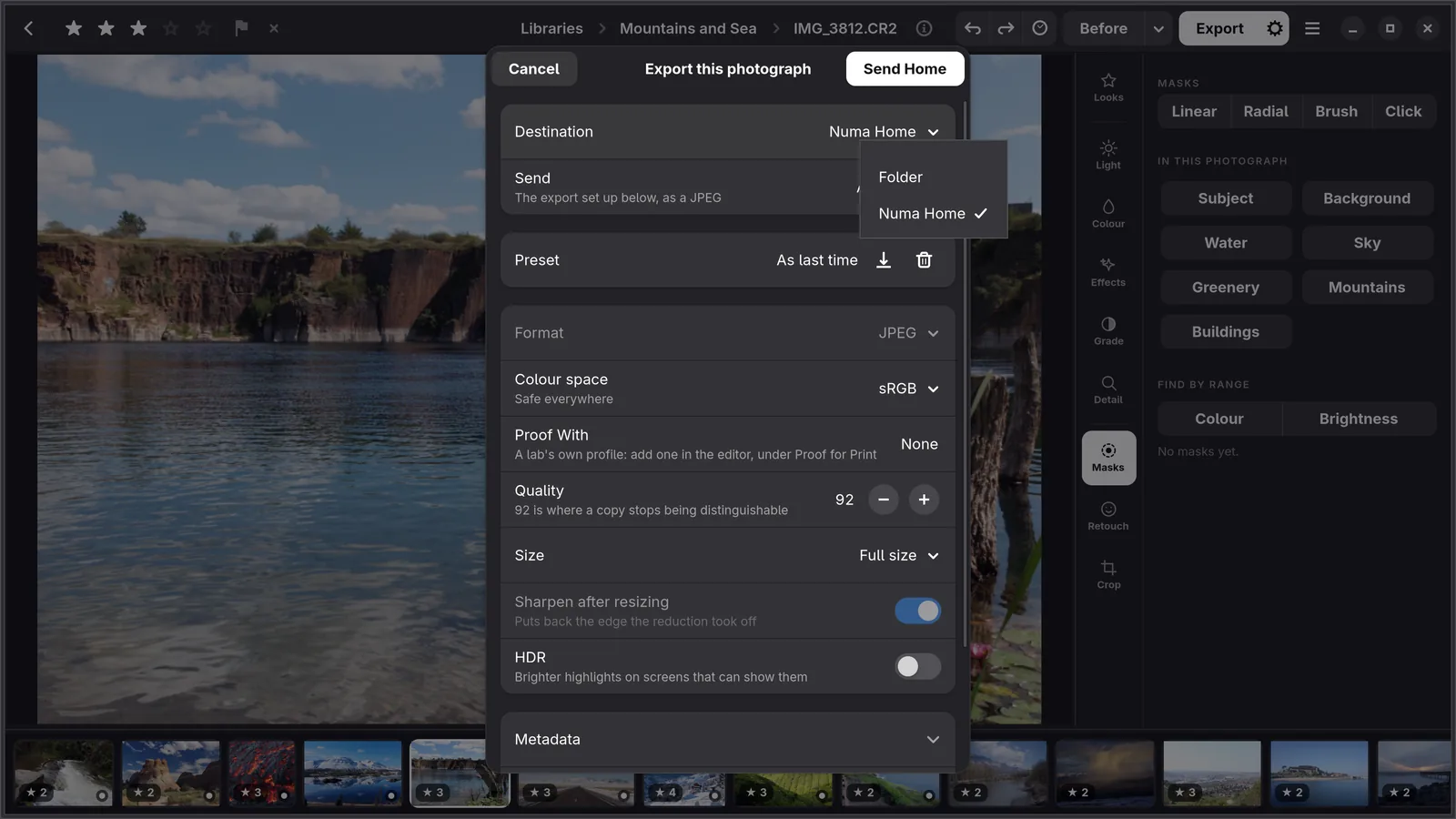
Numa Home is the household’s photo server, on your own NAS. Send Home in the export dialog puts photographs there, as a JPEG or as the original with its edits, and a library there comes into Numa and stays in step both ways.
The details
Install, and the rest.
Install on Ubuntu, Fedora, Debian and Arch
Numa comes in three forms, all for 64-bit Intel and AMD (x86_64): a package for your distribution, and a Flatpak or an AppImage from GitHub. All three keep their libraries, presets and models in the same folders, so moving from one to another loses nothing. Numa is not on Flathub.
- Ubuntu 24.04 and later, Fedora 40 and later, Debian 13, Arch, CachyOS and other distributions with glibc 2.39 or newer: either form works. The AppImage is one file and needs no installing; the Flatpak needs Flatpak itself, which not every distribution has by default.
- Ubuntu 22.04, Linux Mint 21, Debian 12 and other older releases: the AppImage will not start, because it needs glibc 2.39 or newer. The Flatpak brings its own runtime and is the one to try.
Packages for Fedora, openSUSE, Debian, Ubuntu and Arch
For Fedora 44, openSUSE Tumbleweed, Debian Testing, Ubuntu 26.04 and Arch, Numa has a repository on the openSUSE Build Service. Once it is added, Numa updates with the rest of the system. The download page has the lines for each distribution. On Arch the package is called numa-photo, because Arch has a DNS resolver called numa; its lines are in the README, not on the download page. Debian 13 and Ubuntu 24.04 are not there yet, because their Rust is too old to build Numa; use the Flatpak or the AppImage on those.
Flatpak
It needs Flatpak with Flathub added, for the GNOME runtime: about 1 GB the first time, shared with other apps after that. Download the .flatpak file, then:
flatpak remote-add --user --if-not-exists flathub https://dl.flathub.org/repo/flathub.flatpakrepo
flatpak install --user Numa-*-x86_64.flatpak
flatpak run com.tijmen.Numa
AppImage
One file for glibc 2.39 or newer. A downloaded file is not executable yet: in GNOME Files open Properties and turn on Executable as Program, or in a terminal:
chmod +x Numa-*-x86_64.AppImage
./Numa-*-x86_64.AppImage
After that it starts with a double-click; keep the file somewhere it can stay, such as ~/Applications. It needs fusermount3 or fusermount, which most desktops already have. If it does not start and a terminal mentions FUSE, install the fuse3 package: sudo apt install fuse3 on Debian and Ubuntu, sudo dnf install fuse3 on Fedora, sudo pacman -S fuse3 on Arch. Where FUSE is not available at all, ./Numa-*-x86_64.AppImage --appimage-extract-and-run starts it without, unpacking itself to a temporary folder each time.
On first start Numa offers to download the optional models, and the AppImage offers to add itself to the applications menu; the Flatpak is there already. To have photographs open in Numa, turn on Open photographs with Numa in Preferences. In the Flatpak, right-click a photograph in the file manager, choose Open With, pick Numa and turn on Always use for this file type.
RAW, colour and lenses
Numa decodes RAW files with rawler, in pure Rust: 29 formats from 850 cameras, from Canon, Fujifilm, Nikon, Sony, Panasonic, Olympus, Pentax, Leica, Hasselblad, Phase One and more, as well as JPEG, PNG and HEIF. Fujifilm and Sony files are tested end to end; files from other cameras open, but have had less testing.
Colour comes from a DNG camera profile when there is one for your camera, chosen automatically, and otherwise from the colour matrix in the file. Lens corrections for vignetting, distortion and colour fringing come from the LensFun database, built in. On screen, photographs are shown in your display’s colour profile.
Fujifilm and X-Trans
Fujifilm files get the lens corrections stored in the RAF, and X-Trans files the Markesteijn demosaic at full resolution. Info shows the film simulation the camera was set to, and in the loupe Numa draws the point the camera focused on; a double-click inside it goes to 1:1 on that spot.
Masks and AI, on your own computer
The sky, a subject, a person, water or greenery: found in one click by models that run on your computer, not on a server. Click on anything else to select it. There are also AI denoise, AI sharpen, Super Resolution, and Remove for what does not belong in the frame.
The models are optional downloads you choose in Add-ons, and everything else works without them. Numa runs on the CPU and needs no graphics card; an optional GPU plugin (Vulkan) makes the heavier models, such as the found masks, click to select and AI denoise, several times faster.
Photo culling from the keyboard
Analyse measures every frame in a library: sharpness, blown highlights on the raw data, frames that came out nearly black or blank, and how sharp each face is; it asks when eyes look closed and groups bursts with the sharpest frame marked. From that it suggests a rating with a short reason, such as soft or best of burst, and never overwrites one you gave. Set a target and the loupe counts your picks against it.
| Key | What it does |
|---|---|
| Space | Shows the selected photograph large, in the loupe |
| Left Right | Steps through the shoot |
| Up Down | In the loupe: picks or rejects, and goes on to the next frame |
| Backspace | In the loupe: takes the last mark back and returns to that frame |
| 0–5 | Rates |
| P X U | Picks, rejects or clears the flag |
| C | Compares two to four selected photographs side by side |
| Enter | Opens the editor |
| Ctrl+/ | Lists every keyboard shortcut |
Delete does nothing while the loupe is open, and a reject never removes a file.
Libraries are folders
Add a folder and it is a library: no import step, no copies, no sidecar files, and your originals are never written to. Libraries on external drives keep their thumbnails while the drive is away. Albums can hold photographs from any library. If you download the model for it and name people yourself, Numa recognises them in your other photographs and lists them under People, all on your computer.
Looks, LUTs and presets
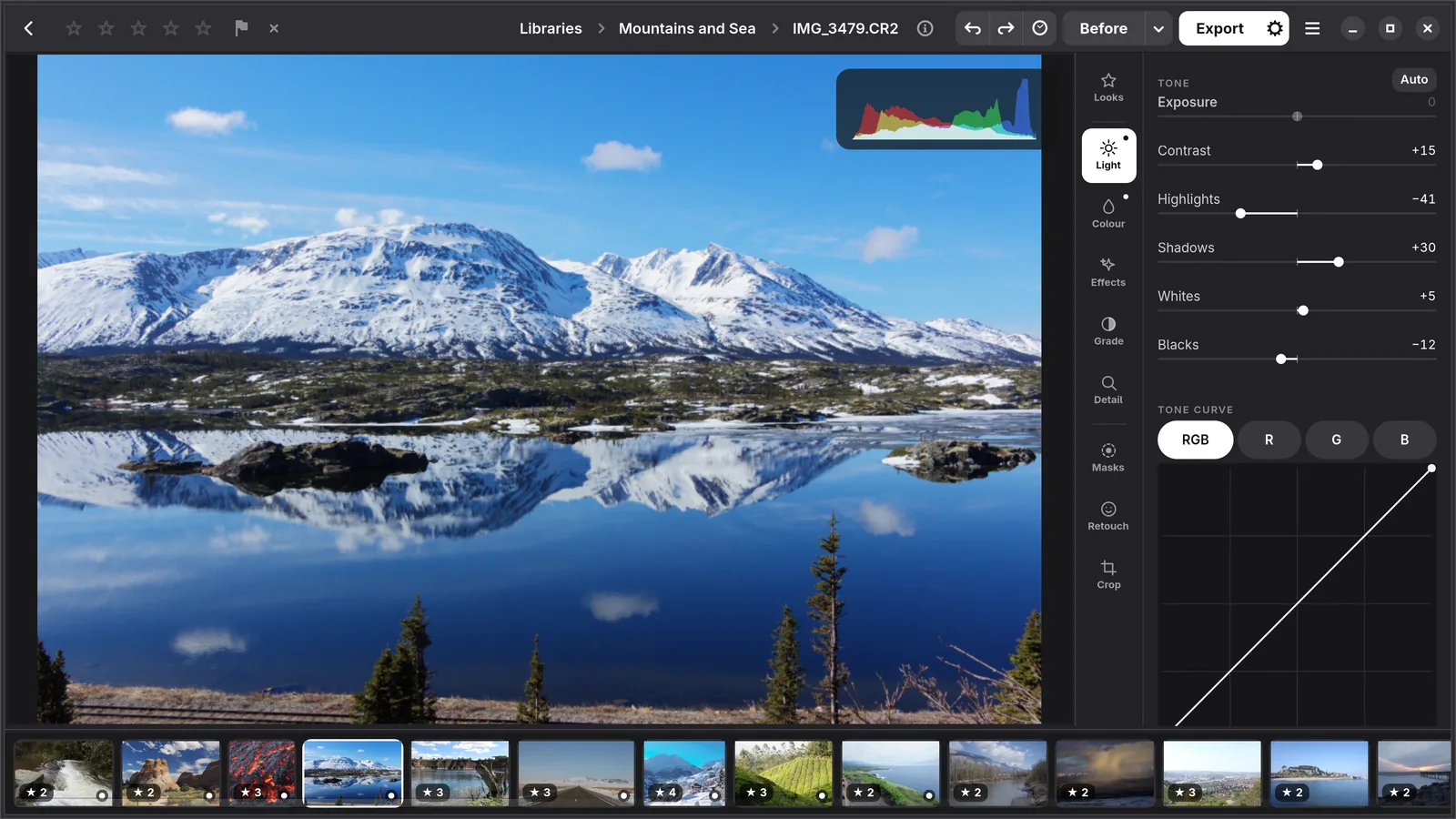
Twelve built-in looks with a Strength slider, LUTs (.cube and .3dl) with an Amount, a colour grading wheel for shadows, midtones, highlights or the whole frame, curves per channel, and presets imported from Lightroom and Capture One.
Coming from Lightroom
There is no Lightroom for Linux. Numa imports presets from Lightroom Classic and Lightroom, and styles from Capture One. The result is close rather than the same, and Numa lists what it could not translate. A DNG exported from Numa carries its edit as Camera Raw settings that Lightroom reads, roughly; crop, curves, masks and retouching stay behind.
Export
JPEG, PNG, 16-bit TIFF, AVIF, JPEG XL (when libjxl is installed), DNG with most of the edit as Camera Raw settings, and HDR JPEG with a gain map; in sRGB, Display P3, Adobe RGB or ProPhoto, with the profile embedded. Presets, a watermark, file name templates and batch export. Existing files are never overwritten.
Numa Home
A photo server for the household, in one Docker container on your NAS or any computer with Docker: every library in a browser, raws as Numa develops them, people, search in words, a card in the NAS imported from the browser, and Tidy Up for copies and frames you do not need. From Numa, Send Home exports to it, a library there comes into Numa and stays in step both ways, and Open in Numa takes a photograph from the browser to the editor.
More about Numa Home · Numa Home on GitHub · Numa Home in the guide
System requirements
- A 64-bit Intel or AMD computer (x86_64). There are no builds for ARM Linux.
- For the Flatpak: Flatpak with Flathub added, and about 1 GB for the GNOME runtime the first time.
- For the AppImage: glibc 2.39 or newer, and fusermount3 or fusermount.
- No graphics card is needed. The optional GPU plugin uses Vulkan.
- To build from source: Rust, GTK 4.12 and libadwaita 1.5 or newer.
Updating and removing
To update, download the newer file from GitHub: a newer .flatpak installs over the old one with the same command, and a newer AppImage replaces the old file: make it executable as before and start it once, and the menu entry follows it. The AppImage looks for new versions, at most once a day, only if you say yes when it asks; the Flatpak never looks.
To remove Numa, run flatpak uninstall --user --delete-data com.tijmen.Numa, or delete the AppImage after turning off its menu entry in Preferences. Your photographs are never touched. Numa’s own files are in ~/.local/share/numa and ~/.cache/numa, and each library has a hidden .numa folder with its catalogue and thumbnails; delete those too if you want nothing left behind.
Free and open source
Numa for Linux is free and open source. Its source is on GitHub under the GNU General Public License, version 3 (GPL-3.0): use it for anything, including paid work, and read, change and share it. Whatever you pass on, changed or not, must stay under the same licence and come with its source. Numa for iPhone, iPad and Mac is a separate app and is not open source.
The optional add-ons keep their own licences, and two of them are for non-commercial use only: ViTMatte-S, for hair and fur in Refine edge, and SFace, for recognising people; leave them out for paid work. Numa’s built-in looks and its own camera profiles come inside the Flatpak and the AppImage, but are not part of the source on GitHub and not under the GPL-3.0.
Numa’s code is written by Claude, an AI model by Anthropic, working from my feedback as a photographer; the decisions and measurements are written down in the repository, and more than 600 automated tests run on every push.
Numa sends nothing about you or your photographs anywhere. The AppImage looks for new versions only if you say yes when it asks, and the Flatpak never does.
Numa beside darktable and RawTherapee
darktable and RawTherapee, open source like Numa, are the established RAW developers on Linux, GIMP is for work on the pixels in layers, and digiKam is for very large collections. Numa does some things differently: libraries are plain folders with nothing written beside your photographs, culling measures each frame, and masks are found by kind. darktable or RawTherapee fit better if you want ARM or Windows, a package from Flathub or your distribution, or their depth and years of testing on many cameras.
How Numa compares with darktable, RawTherapee, ART, RapidRAW, digiKam and GIMP
Questions
Is Numa on Flathub?
No. Numa for Linux comes as a Flatpak bundle and an AppImage from its GitHub releases page, for 64-bit Intel and AMD.
Is Numa open source?
Numa for Linux is: its source is on GitHub under the GNU General Public License, version 3 (GPL-3.0). Numa for iPhone, iPad and Mac is a separate app and is not open source.
Can I use Numa for commercial work?
Yes. The GPL-3.0 allows any use of Numa for Linux, including paid work; whatever you pass on, changed or not, must stay under the same licence and come with its source. Two of the optional add-ons are for non-commercial use only: ViTMatte-S (hair and fur in Refine edge) and SFace (recognising people). Leave those two out for paid work.
Will the AppImage run on Ubuntu 22.04 or Debian 12?
No. The AppImage needs glibc 2.39 or newer, which those releases do not have. The Flatpak brings its own runtime and is the one to try there.
Does Numa need a graphics card?
No. Editing runs on the CPU. An optional GPU plugin over Vulkan makes the heavier AI models, such as the found masks, click to select and AI denoise, several times faster.
Does Numa run on ARM Linux, or on Windows?
No. Numa for Linux is built for 64-bit Intel and AMD only, and there is no Windows version. Numa for iPhone, iPad and Mac, on Apple silicon, is a separate app; its TestFlight beta opens once Apple’s review is done.
How do I update Numa?
Download the newer file from GitHub. A newer .flatpak installs over the old one with the same command, and a newer AppImage replaces the old file once you have made it executable and started it.
Which RAW files does Numa open on Linux?
RAW files in 29 formats from 850 cameras, including Canon CR2 and CR3, Fujifilm RAF, Nikon NEF, Sony ARW, Panasonic RW2, Olympus ORF, Pentax PEF and DNG, as well as JPEG, PNG and HEIF.
Can I use Lightroom presets on Linux?
Yes. Numa imports Lightroom Classic .lrtemplate and Lightroom .xmp presets, and Capture One styles. The result is close rather than the same, and Numa lists what it could not translate.
How does Numa compare with darktable and RawTherapee?
darktable and RawTherapee are mature RAW developers, open source like Numa and packaged in most distributions. Numa is newer; it works on plain folders with nothing written beside your photographs, measures each frame when culling, and finds masks by kind. There is a side-by-side comparison at numa.photo/linux-photo-editors.
More about Numa
Come along.
Numa for Linux is out now. Try it on your own photographs and tell me what you think.